Case studies/Just Walking The Dogs

Dog walking & pet care · Folkestone

A local round, run like a system.

A dog-walking website with a full pet-care portal behind it: four service pages a search engine can read on the first response, and a booking system where the rules about which dog can do what are written down instead of remembered.

www.justwalkingthedogs.co.uk
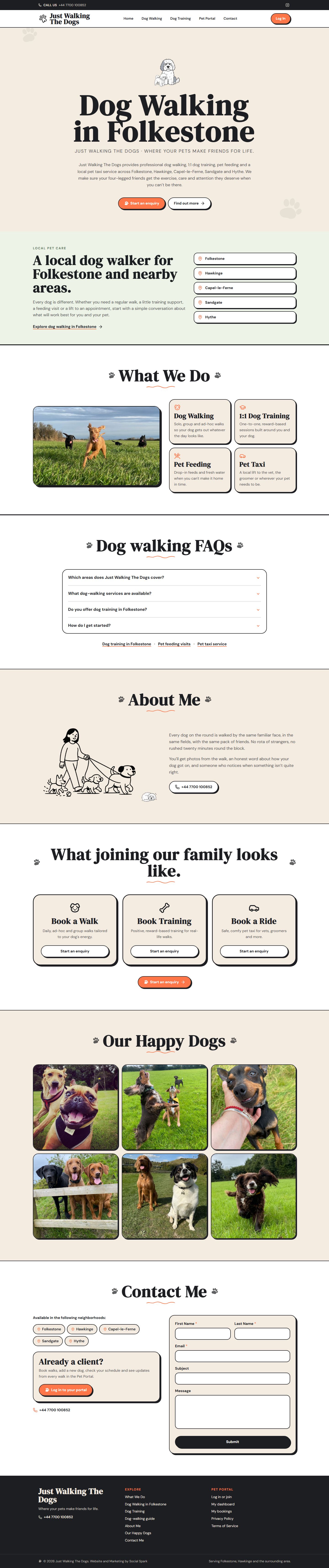
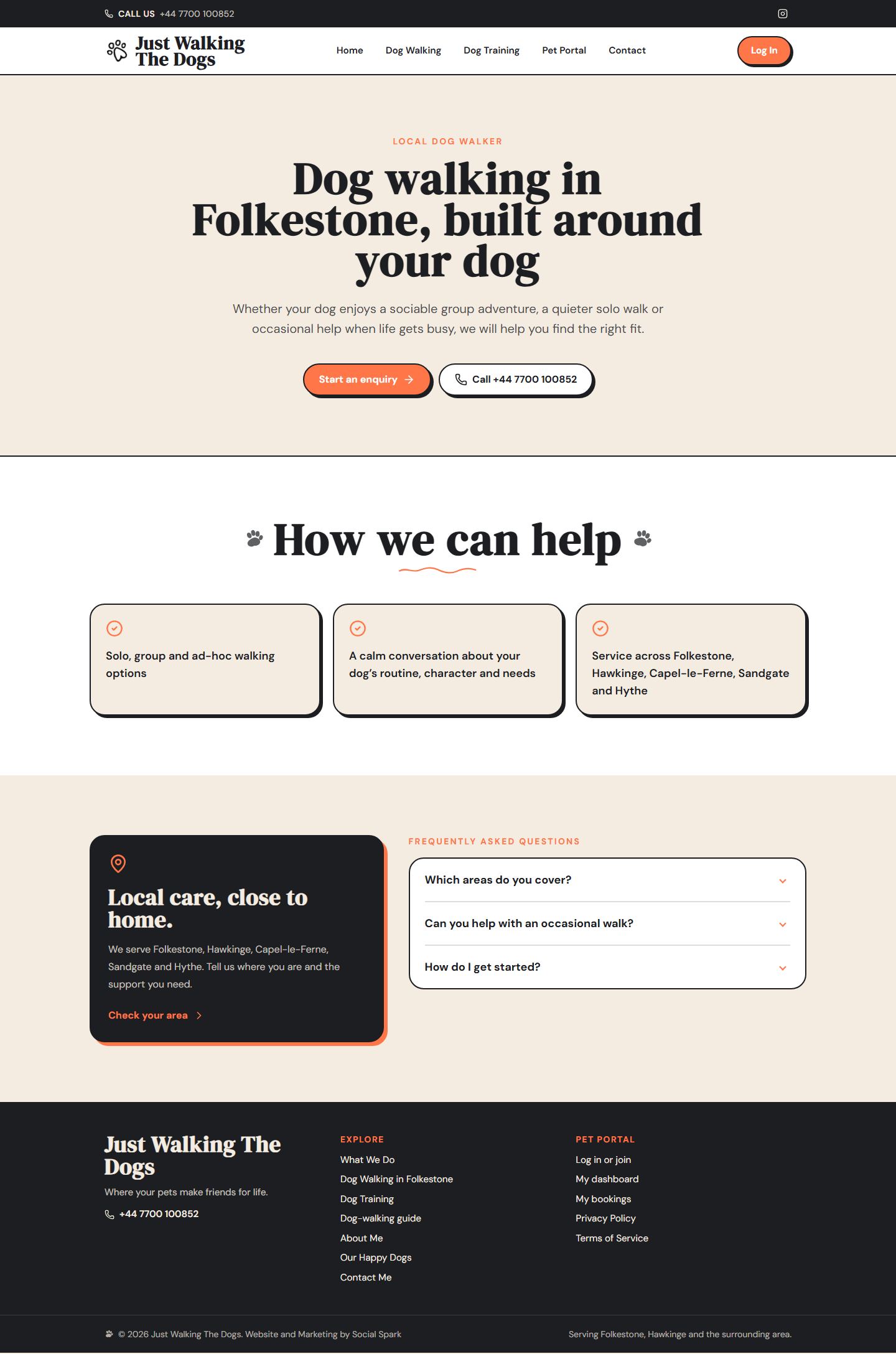
Just Walking The Dogs homepage, scrolling

Surface

Public site + private portal

Area served

Folkestone and east Kent

Roles in the portal

Customer · walker · owner · admin

Status

Live at justwalkingthedogs.co.uk

The brief

Be findable for four different searches, and run the round once someone calls.

Just Walking The Dogs is a local business doing four distinct jobs — walking, one-to-one training, feeding visits and a pet taxi — across five towns and villages. The website had to make each of those findable on its own terms. Behind it, the work of actually running the round needed somewhere to live that was not a phone and a notebook.

01

Two audiences, one deployment

A visitor who wants a phone number should not download a booking calendar to get it. The public pages are the only thing in the initial bundle; everything behind sign-in — the portal and the Firebase SDK that comes with it — sits behind lazy route boundaries.
02

A local search page for each service

The business names four services. Each one got its own route, its own questions and its own structured data, rather than four anchors on a single homepage that ranks for nothing in particular.

03

Not every dog can book everything

The business already worked this way — some dogs need a meet and greet first, some are solo-walk only, some have no off-lead permission. That was a set of rules held in someone's head. The build turned it into an eligibility engine the booking form has to obey.

04

The owner should hear about a booking without opening the app

Before this build, a new request was a database row visible only inside the portal: the owner found out by happening to look, and the customer got no confirmation at all. Booking email now goes out from the Worker.

What was built

One address. A shop window, and a working system behind it.

The two halves share a domain, a palette and a deployment, and almost nothing else. The front is public, indexed and built to be read cold. The back is signed-in, closed to search, and built to be used every day.

Public

Six pages anyone can reach

A homepage and a page each for dog walking, dog training, pet feeding and the pet taxi, plus privacy and terms. All of them are in the site’s own sitemap and return index, follow.

  • Service, area and FAQ copy written per page
  • One enquiry route and one phone number throughout
  • Structured data for a local professional service

Behind sign-in

Sixteen routes nobody can index

Bookings, dogs, customers, availability, community, training, settings and the admin screens. Every one is blocked in robots.txt and served noindex, nofollow by the Worker, because they hold real people and real animals.

  • Four roles: customer, walker, business owner, admin
  • Onboarding a customer cannot skip past
  • An append-only audit log of who changed what

The journeys

Four people, four different screens.

Someone searching, the owner, a client and a walker all want something different from the same system. Each gets a first screen built around their own next step.

A page per service, readable before any JavaScript runs

Dog walking, dog training, pet feeding and pet taxi each get their own route, their own FAQs and their own structured data. The Worker writes the title, description, canonical and schema into the very first response, so a crawler does not have to run the app to understand what the page is about.

  • Four services, four routes, one enquiry form
  • Areas named on the page: Folkestone, Hawkinge, Capel-le-Ferne, Sandgate, Hythe
  • Metadata and JSON-LD served on the first byte, not after hydration
  • A no-JavaScript fallback with the phone number in it
www.justwalkingthedogs.co.uk/dog-walking-folkestone
A page per service, readable before any JavaScript runs — desktop

The three portal screens above are the delivered interface running against fabricated records. See the data-protection note below.

The idea the build turns on

Which dog can book what, and why not.

A dog-walking business runs on judgements that are easy to hold in your head and expensive to get wrong. This one has not met that dog yet. That one cannot go off lead. That one is solo walks only until the training has happened. Every booking form on the internet ignores all of it.

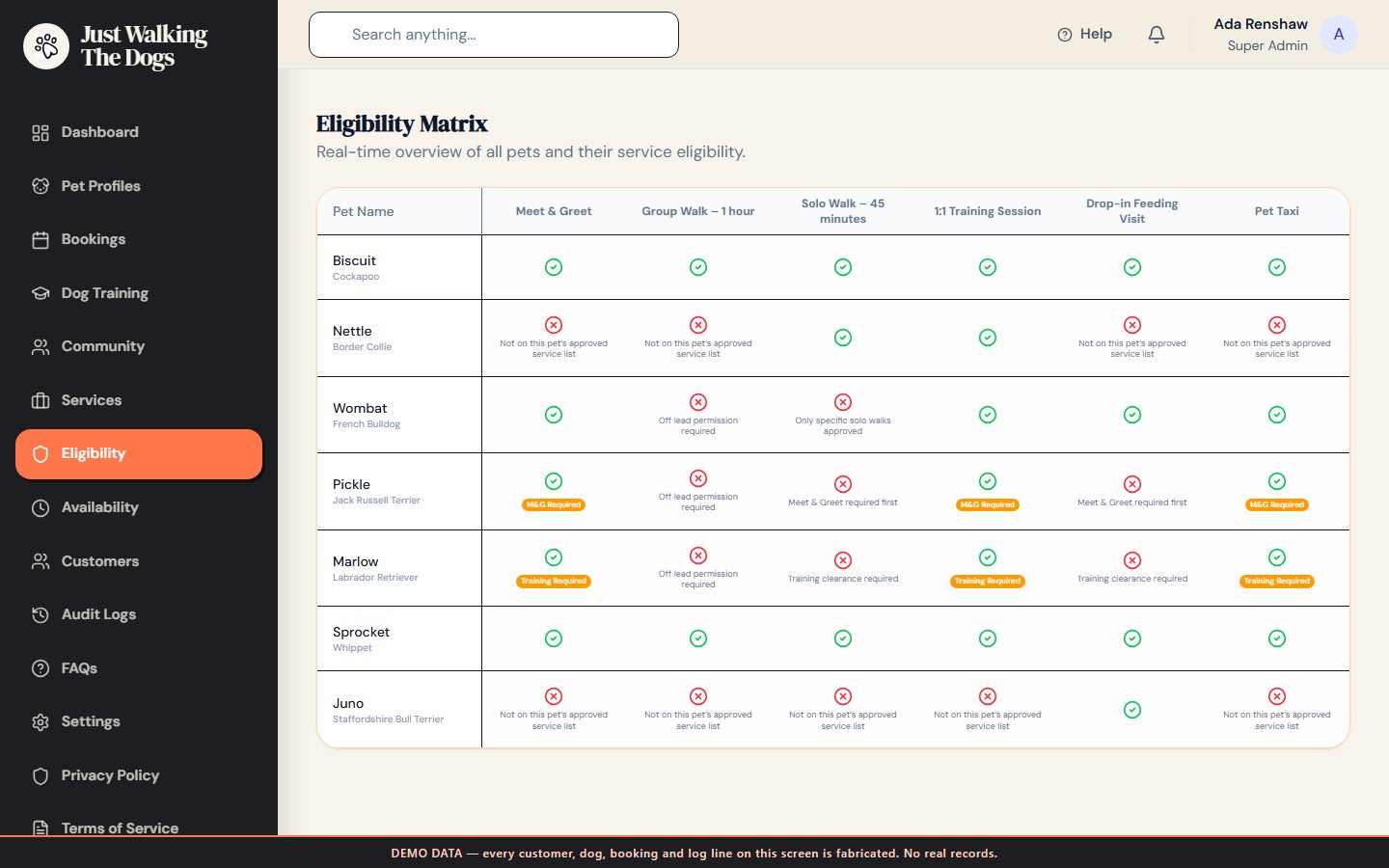
Here those judgements are fields on the dog’s record — a walk tier, a training tier, taxi and house-sitting eligibility, off-lead permission and an explicit list of approved services — and a single rules function decides, for every dog and every service, whether a booking is even offered. When it says no it gives the reason, in the words the owner would use.

www.justwalkingthedogs.co.uk/eligibility · demo data
The eligibility matrix: every dog against every service, with the reason each combination is closed
01

The rule is written once

The customer's booking form, the owner's booking screen and this matrix all call the same function. There is no second copy of the policy to fall out of step.

02

A refusal explains itself

“Meet & Greet required first”, “Off lead permission required”, “Not on this pet's approved service list”. A closed door with a reason on it is a prompt, not a dead end.

03

The whole round on one screen

Every dog against every service, so the owner can see at a glance who is waiting on a meet and greet or a training clearance.

Visual proof · the public site

Hand-drawn, but not vague.

The illustration and the sketched paw prints carry the warmth. Everything underneath them is a hard 2px ink border and a flat offset shadow, so the page still reads as structure rather than mood.

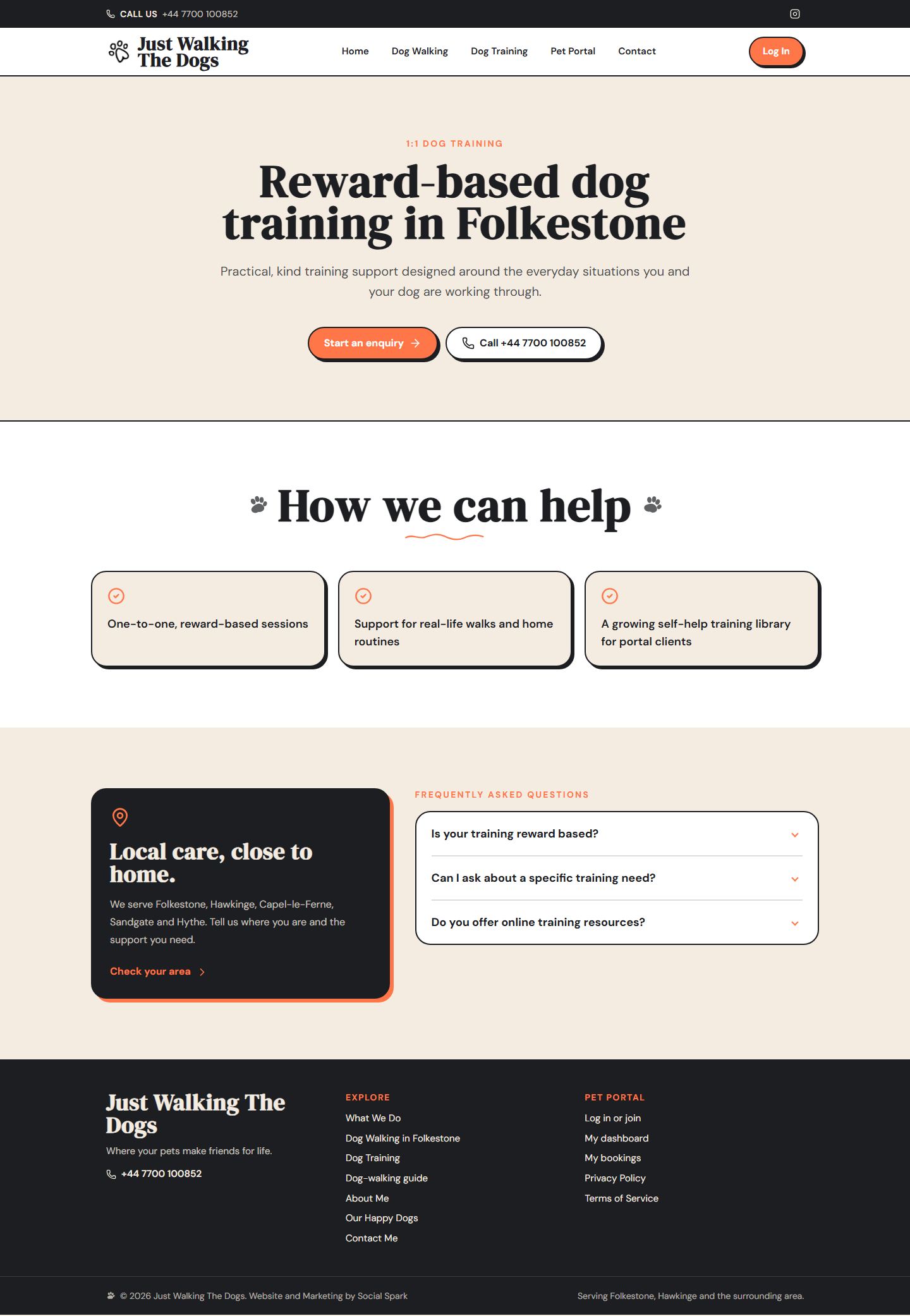
www.justwalkingthedogs.co.uk/dog-training-folkestone
The dog training service page on Just Walking The Dogs

Every service page answers the same three questions.

What is this, is it available where I live, and how do I start. The FAQ block under each one is written for the questions people actually ask a local dog walker, and it is the same copy the page’s structured data carries.

  • One heading, one paragraph, three specifics
  • The five areas served, named on the page
  • An enquiry and a phone number, always in reach
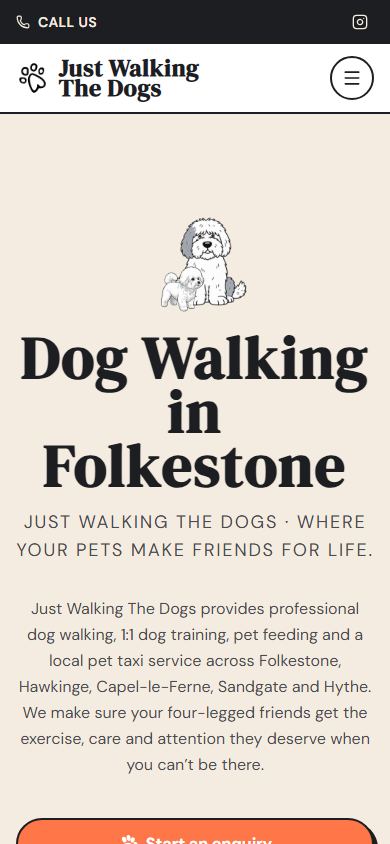
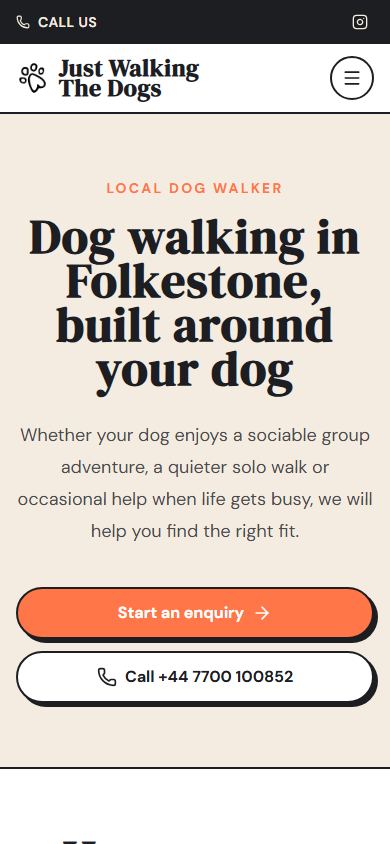
The Just Walking The Dogs homepage on a phone

Built for the phone in a coat pocket.

Most of the traffic to a local pet-care site is someone standing up, one-handed, deciding whether to call. Tap targets stay at 48px, the call button sits in the header bar on every page, and the enquiry form is the last thing on the page rather than a modal fighting for attention.

Visual proof · behind sign-in

The part of the business the website is actually for.

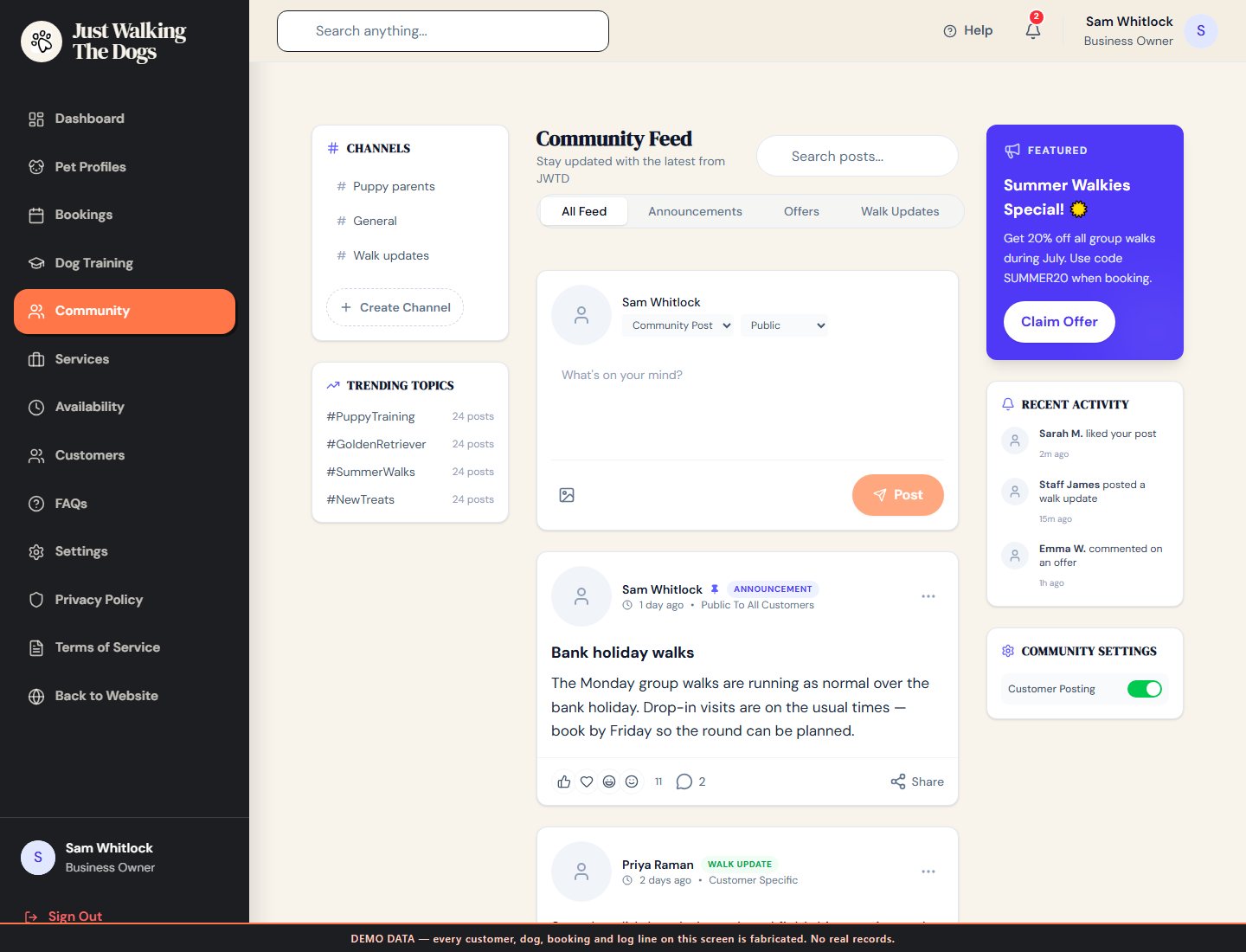
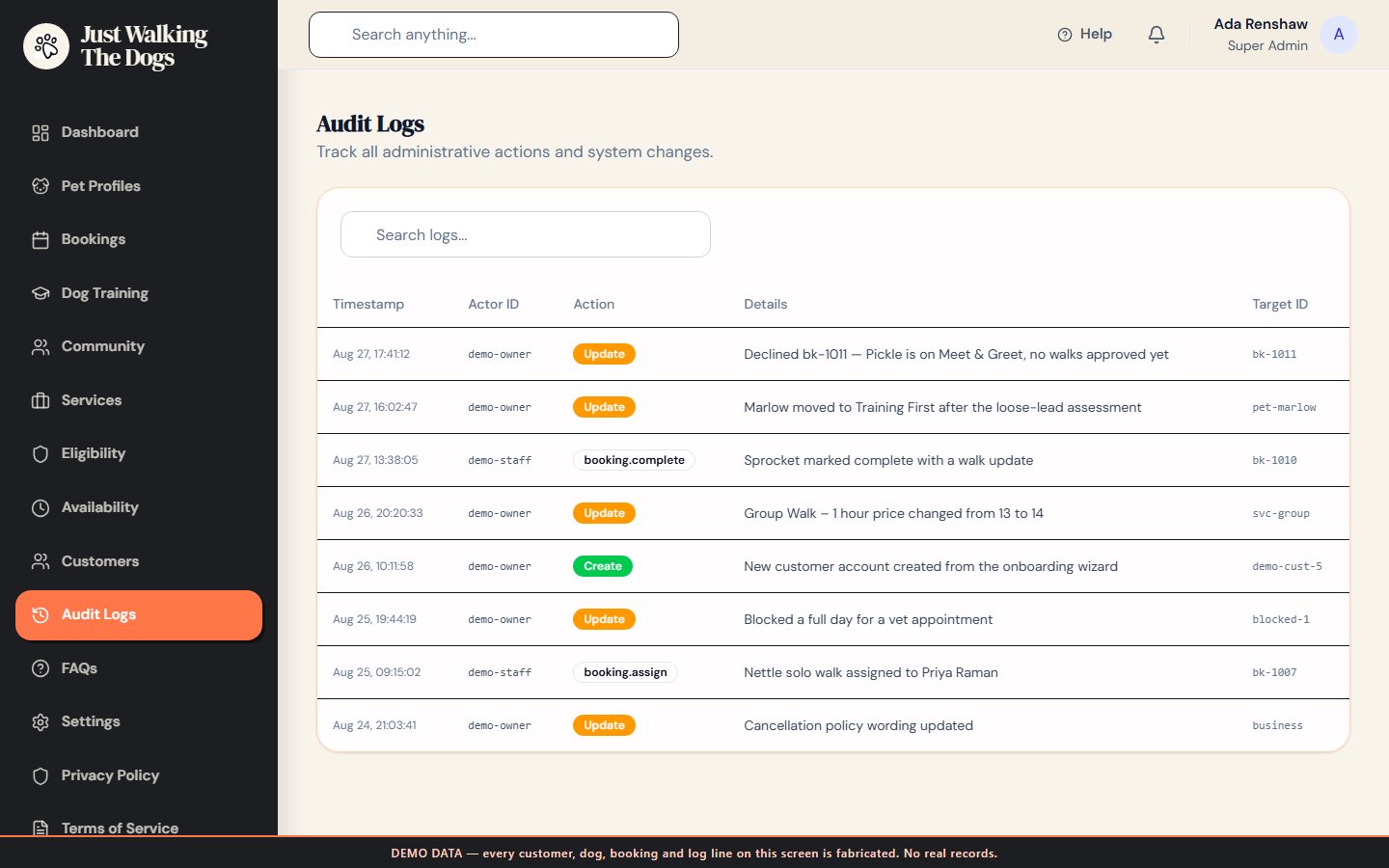
Dogs and their notes, bookings and recurring series, customers and their onboarding state, business hours and blocked dates, a community feed for walk updates and announcements, a training library, and an audit log of every change. It is the difference between a website that advertises the business and one that runs alongside it.

Data protection: these screens show fabricated records. The real portal holds customers, dogs, addresses, vet details and behaviour notes, so it is never photographed. Every shot here comes from a scratch copy of the delivered build with the database replaced by invented data — invented people and dogs, reserved 07700 900xxx numbers and example.com addresses. The interface, the layout and the rules are exactly as delivered; only the data is fictional, and each screen carries a visible label saying so.
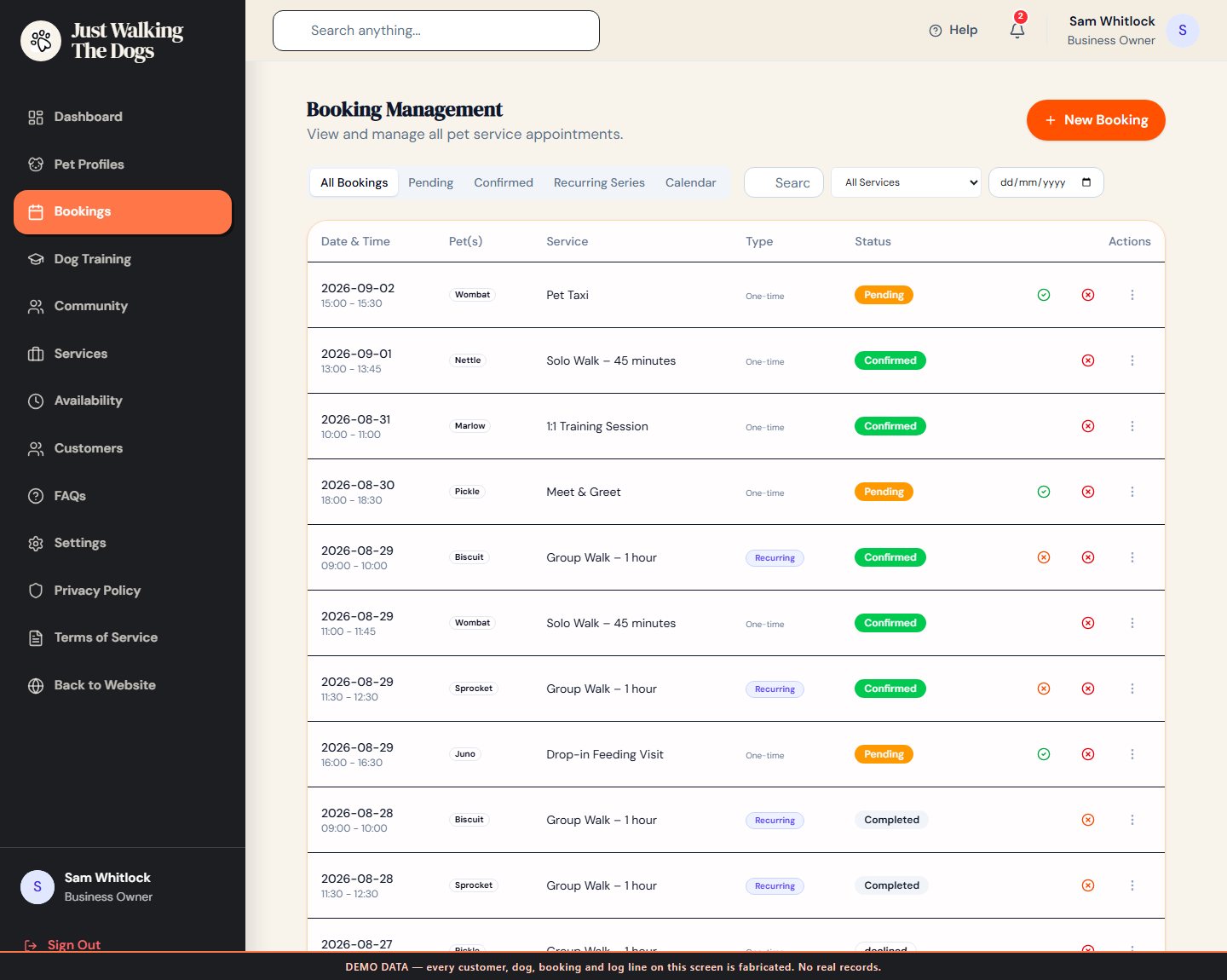
www.justwalkingthedogs.co.uk/bookings · demo data
Booking management: pending, confirmed and recurring series

Bookings

Requests, confirmations, recurring series and a calendar, filtered by service, status or date.

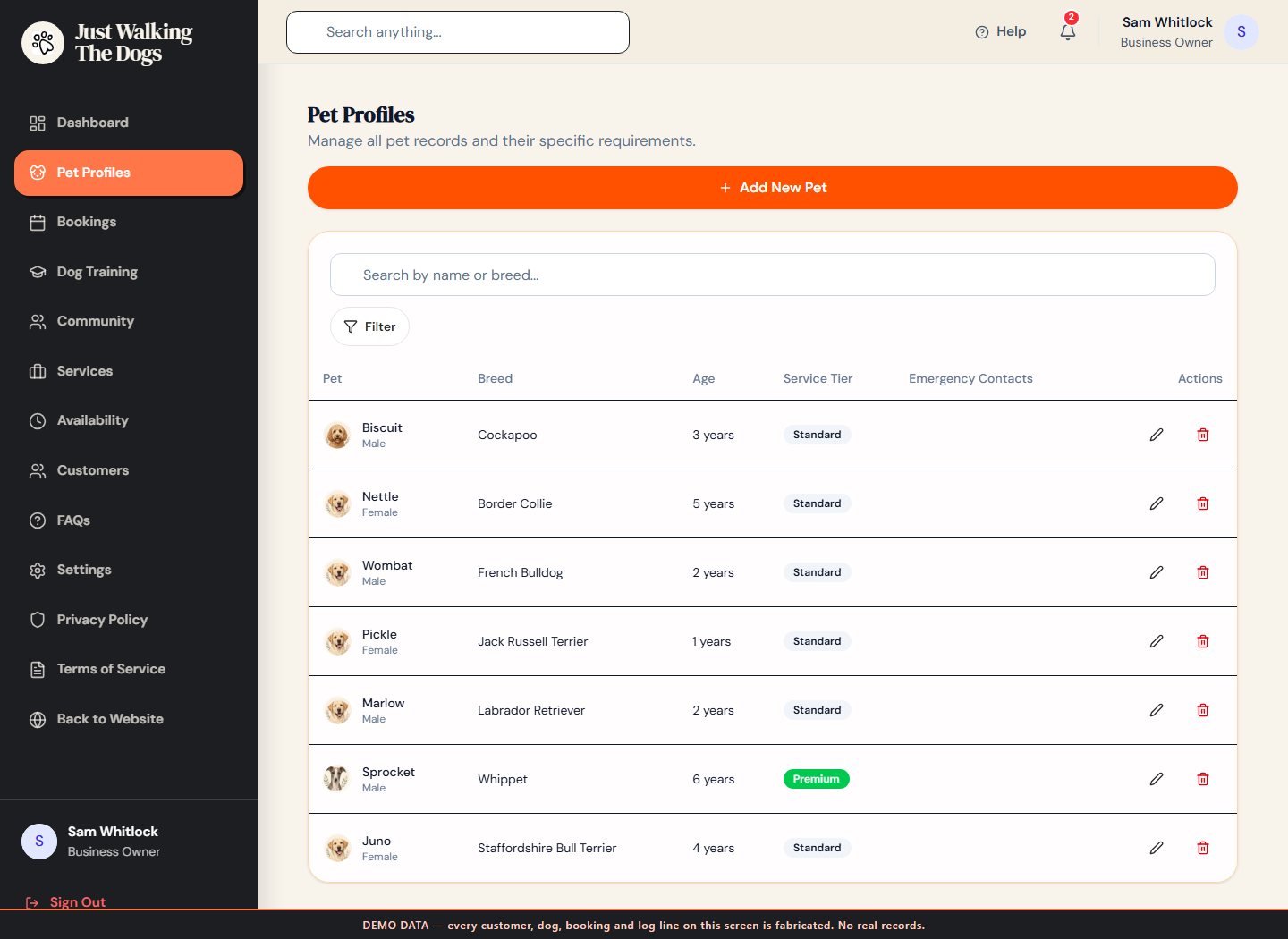
www.justwalkingthedogs.co.uk/pets · demo data
Pet profiles with breed, age and service tier

Dogs

Health, behaviour, recall, lead manners, triggers, vet and emergency contacts — on the record, not in a message thread.

www.justwalkingthedogs.co.uk/community · demo data
Community feed with announcements, offers and walk updates

Walk updates

Announcements, offers and per-customer walk updates in channels, so a photo from the field has somewhere to go.

www.justwalkingthedogs.co.uk/audit-logs · demo data
Audit log of actions taken in the portal

Audit log

Who declined that booking, who moved that dog to Training First, and when. Append-only, admin only.

Why it looks like this

One palette, two temperatures.

The public site is loud on purpose: a heavy serif at display size, thick ink outlines and flat drop shadows that make every card look like something you could peel off the page. The portal keeps the same beige, ink and orange but softens every edge — warm off-white cards, generous radii, low shadows — because it is a screen someone looks at every morning, not once before they call.

DM Serif Display

Wordmark, hero and every section heading

DM Sans

Body copy, forms, navigation and portal data

Beige, ink, orange

#F4ECE1 ground · #1D1E21 line and type · #FF7648 action

Sage and peach

#edf3e7 and #FFD1C2 — section shifts and status, never decoration

Ground

#F4ECE1

Ink

#1D1E21

Action

#FF7648

Sage

#edf3e7

Peach

#FFD1C2

How it is built

A single-page app that still behaves like a website.

Vite, React and a Cloudflare Worker

React 19 with React Router and Tailwind v4, built by Vite and served by a Worker through the ASSETS binding with a single-page-application fallback, so a hard load of /privacy resolves.

Metadata written on the first response

The Worker uses HTMLRewriter to set the title, description, Open Graph tags and canonical per public route, append ProfessionalService and Service JSON-LD, and prepend a no-JavaScript summary. The app stays client-rendered; a crawler no longer has to run it.

The portal is closed to search

All sixteen portal paths are Disallow-ed in robots.txt and served with X-Robots-Tag: noindex, nofollow by the Worker. They hold customer and animal records and have no business being indexed.

Firebase behind a lazy boundary

Auth, Firestore and Storage carry the portal. None of it is in the initial download — the module that imports Firebase is only ever reached through a lazy import from the marketing routes.

Booking email from the edge

Cloudflare Email Sending, deliberately on the notifications subdomain rather than the apex: onboarding the apex would have handed Cloudflare SPF and DKIM for a domain that already carries the business's Google Workspace mail.

The browser cannot dictate an email

The request carries only a Firebase ID token and a booking id. The Worker reads that booking back out of Firestore using the caller's own token, so the security rules decide what it is allowed to see, and the email is composed from the database — never from the request body.

Scope

What was deliberately left out.

A build this size is mostly decisions about what not to make. These are the four worth naming, because each one is a thing a reader might otherwise assume is there.

01

No prices on the public site

Walks are quoted after a conversation about the dog, so publishing a price list would have created the wrong first question. Prices live on the services the owner manages inside the portal.

02

No card payments

The portal takes bookings, not money. Billing is a link the owner controls, and the advanced training programme checks out externally. Adding a payment processor would have pulled PCI scope into a build that did not need it yet.

03

No form-capture endpoint yet

The public enquiry form composes the message in the visitor's own email client. It is the honest current state of that flow, not a silent failure, and it is the next thing worth wiring up.

04

No reviews, no live tracking

There is no review surface and no GPS tracking anywhere in the build. Neither was scoped, so neither is implied.

Trust is part of the work.

What this study does not claim.

There is no traffic, ranking, enquiry, booking or revenue figure anywhere on this page, and no quote from the owner. None has been measured or given, so none is published. Everything above is something you can see on the live site or in the delivered build.

Every portal screenshot is fabricated data on the real interface, captured from a scratch copy that has no route to the live database. No number, name, dog or booking on those screens is real, and none of them should ever be quoted as if it were.

If the rules live in your head, they can live in your website.

Most small service businesses run on judgements nobody has written down. Getting them into the system is usually the difference between a website that looks nice and one that saves the owner an hour a day.